

![PIXY Wireless[DEFAULT]](http://emeet.com/cdn/shop/files/pixy_647010c6-662a-4af7-b8bb-ad66e457c662.png?v=1780025408&width=480)


Patients often access their care through telehealth. The most significant pros of this type of telehealth is access to expertise in less than 30 minutes and helping them make informed decisions. It also means they can stay in contact with family, friends and colleagues. But there are some caveats to telehealth care, such as problems patients may experience before accessing health care. Because patients lack expertise in telehealth, in some cases, they don't know how to respond.
Sometimes, they may be asked to provide information and guidance or be denied participation in telehealth activities. These are common challenges. To address these issues, patients may need to use suitable conferencing equipment to maintain communication and stay in touch with others.
Why conduct Telehealth?
According to a survey from Statista conducted in 2021, 51 percent of Americans said they used telemedicine through live video calls with their healthcare provider. Some virtual care modes, however, have seen modest increases in use.
There has been significant growth in the telemedicine market over the past few years. Approximately 50 billion U.S. dollars were estimated to be the telemedicine market size in 2019. By 2030, the market is projected to reach 460 billion U.S. dollars, a significant increase. Traditional healthcare costs have increased, as has funding for telemedicine and the number of people using digital health services.
Uses of Video Conferencing Equipment
Video conferencing equipment has the advantages of scalability, flexible connection, convenient operation and multi-language processing. It realizes the networking of the medical monitoring system in the hospital. It can bring together nurses from multiple departments to perform real-time remote consultations and other medical treatments. There are various scenarios where video conferencing equipment comes in handy for doctors and nurses.
1. Telemedicine
Telemedicine can help patients get the best treatment options by using video calls. For example: Before administering medication, doctors can use video calls to inquire about the patient's condition and follow treatment recommendations rather than being advised to go to a hospital specialising in that speciality. Telemedicine is also an issue for the potential customer base, as it can help doctors communicate more effectively with patients.

2. Doctor's Daily Dorm Checkups
The traditional daily checkups for the doctors where is doctor walks around all patients' rooms. Usually, doctors will ask the patients a few questions and see if there is any improvement after the treatment. For this procedure, doctors can use video conferencing equipment such as a webcam to conduct the daily checkup. This will save time and be much more convenient for doctors.

3. Remote Patient Monitoring
Traditional patient monitoring is where a nurse is assigned to a patient, and the nurse will constantly walking in-and-out of the patient's room to monitor the patient, which is highly inconvenient for the nurse. Therefore, the hospital should start to consider remote patient monitoring. This is when a patient has specific symptoms that nurses must monitor regularly. If there is any downfall, the nurses must notify the doctors for further treatment. This monitoring process would also be more suitable using video conferencing equipment. If the patient has a contagious disease, the hospital would be at a high risk for the nurses to monitor the patient at a close distance. However, using video conferencing equipment, the nurses can monitor the patient in a safe area but still see the patient's status clearly.

Select the correct Equipment for Telehealth
If you're looking for remote access, more interaction, and more efficient patient care, you could consider the following factors:
1. Easy-to-Use Video Conferencing Equipment
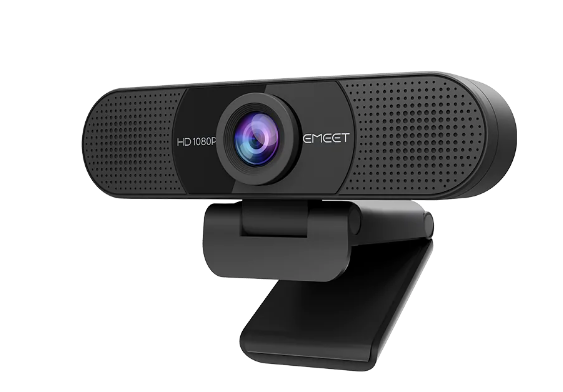
The video conferencing equipment can make it easier for patients to move between home and clinic while staying focused. For example, if a healthcare professional sets up a patient's cell phone as a speakerphone, it can be accessed over the wireless network without any intervention. Patients can also communicate via Bluetooth-connected headphones or speakers to easily hear and interact with others. The EMEET SmartCam C960 is one of the best examples. The webcam is a HD 1080P Webcam with Microphones, which delivers crisp and detailed images in any scene owing to 1080P resolution and sharp fixed focus. Also, it is plug-and-play, you can join video calls in seconds or flip the cover over to protect your privacy.
2. Multi-Channel Audio System Equipment
Using devices that support multi-channel audio enables patients and family members to perform any activity at any time. For example, connect a microphone or speaker to your smartphone if you are conversing with a patient's family and no one else is present. Then, you can choose a device that allows multiple microphones to speak simultaneously. Alternatively, you can connect a microphone to the device via Bluetooth or another audio receiver and use the audio output during the meeting.
3. Smart Speaker & Microphone System Equipment
A speaker with a smart speaker or microphone is ideal if you want to converse with your patients in a way that is pleasing to the eye. It converts audio input directly into text through a microphone, reducing the time and cost required to interact between you and your patient. Smartphones have many features, so you can easily use them to create multiple applications to ensure that your meeting content stays consistent. These audio outputs will give patients more information than they see on a screen. Healthcare professionals can also send patient messages through a speaker or microphone system. The video conferencing equipment, such as the EMEET SmartCam C980 Pro is an All-in-One 1080P Webcam with 4 Mics and 2 speakers. Also, this webcam can simply plug in and join meetings right away with the all-in-one yet low-power consumption device.

4. Computer/Laptop
This is a portable and versatile laptop with all possible applications and services for your meetings. The device is available in several different features: - Laptop with a USB port and keyboard. You can also use it for the microphone on the Bluetooth speaker. You can also use a USB docking station to make it a replacement for your smartphone, tablet or other devices. It provides all necessary video streaming.
Conclusion
Not only can telemedicine monitoring solutions increase efficiency, but they can also help healthcare organizations reduce costs. Hardware deployment, as well as network connectivity for telemedicine monitoring solutions, require significant capital. This could put your hospital or other vital users at risk if steps are not taken to prevent this from happening.


